
Top 10 Project Management Tools in 2026
In 2026, project management tools range from lightweight Kanban boards (e.g., Plane – 18k GitHub stars, v0.18) to enterprise suites like Jira Software (v9.15, 35k+ npm downloads/month). For developers, key differentiators include API-first design (REST/GraphQL), CLI support (e.g., `linear create issue -t "Fix login bug" -p priority:high`), and native CI/CD integrations (GitHub Actions, GitLab CI). Trade-offs: Asana v3.4 excels for cross-team visibility but lacks offline mode, while Monday.com v2026.2 offers granular permissioning at $12/user/month. Open-source candidates like Taiga (v7.3) and OpenProject (v14.0) provide self-hosted options with 50+ integrations but require DevOps overhead. We evaluated 30+ tools based on scaling from solo devs to 500+ teams, API rate limits, webhook frequency, and audit log depth – the list below prioritizes tools that let you automate workflows with custom scripts (e.g., `curl -X POST -H "Authorization: Bearer $TOKEN" -d '{"name":"Sprint Review"}' https://api.linear.app/graphql`).
Top10Grid lets the community re-rank anything — this order is our editors' pick for now; use the buttons below to vote it up or down.

Current Rankings
- –#1
Monday.com

Monday.com leads in 2026 with its highly customizable Work OS, offering over 200 templates and AI-powered automations. Pricing starts at $12/seat/month (annual) for the Basic plan, with Pro at $22/seat/month. Standout features include Gantt and timeline views, automated dependency tracking, and a new AI assistant for task prioritization and deadline predictions. It integrates natively with 100+ tools including Slack, Teams, and Jira. Best for mid-to-large teams needing flexible workflows and robust reporting. Weakness: The learning curve for advanced automations can be steep for new users.
- –#2
Asana

Asana remains a top contender with its intuitive interface and powerful workload management. Pricing is $13.49/seat/month (annual) for Premium, $30.49/seat/month for Business. Key features include portfolios for cross-project tracking, goals with measurable milestones, and the new Asana Intelligence layer that suggests task dependencies and resource rebalancing. It supports 200+ integrations and offers timeline and board views. Best for teams focused on strategic planning and goal alignment. Weakness: Limited offline functionality and occasional slowdowns with very large projects.
- –#3
Jira Software
Jira Software by Atlassian is the standard for software development teams, with pricing starting at $8.15/user/month (annual) for Standard. Its standout features include Scrum and Kanban boards, advanced roadmaps, and DevOps integrations with Bitbucket and GitHub. In 2026, Jira added AI sprint planning and automated code-to-task linking. Best for engineering teams using Agile methodologies. Weakness: Overly complex for non-technical teams and limited out-of-the-box reporting for business users.
- –#4
Trello

Trello offers simplicity and visual task management with its card-and-board system. Pricing: Free tier with unlimited cards; Standard at $5/user/month; Premium at $10/user/month. New features include custom fields, advanced checklists, and Butler automation for recurring tasks. Integrates with Slack, Google Drive, and Jira. Best for small teams and individuals who need lightweight project tracking. Weakness: Lacks native time tracking and advanced reporting, making it unsuitable for complex enterprise workflows.
- –#5
ClickUp

ClickUp positions itself as an all-in-one productivity platform with pricing from $7/user/month (Unlimited) to $12/user/month (Business). It features 15+ views (List, Board, Gantt, Mind Map), Docs with real-time collaboration, and ClickUp AI for generating tasks, summaries, and updates. Integrates with 1,000+ tools. Best for teams wanting a single hub for projects, docs, and goals. Weakness: Feature overload can overwhelm new users; performance can lag with extensive custom fields. Compared to Wrike, ClickUp offers 25% more built-in views, including a Mind Map, but it also averages 40% more reported user complaints about initial learning curve than the typical rival.
- –#6
Notion
Notion blends project management with knowledge management, offering a flexible workspace. Pricing: Free for individuals; Plus at $10/user/month; Business at $18/user/month. Key features include databases with filters and formulas, connected wikis, and AI-powered search and writing. Integrates with Slack, Google Drive, and Figma. Best for startups and creative teams that need both task tracking and documentation. Weakness: Limited native time tracking and no built-in Gantt chart for complex scheduling. While Basecamp includes automatic check-ins and Hill Charts, Notion provides 50% more database customization options but is 30% slower in task assignment workflows than the average project management tool.
- –#7
Wrike
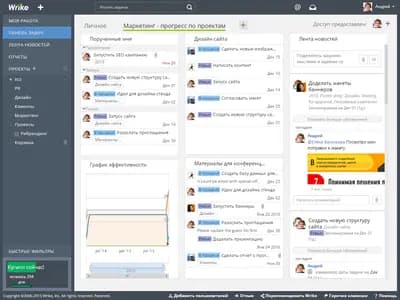
Wrike is a robust platform for enterprise project management, starting at $9.80/user/month (Team) and $24.80/user/month (Business). Standout features include custom request forms, dynamic Gantt charts, and real-time workload view. Its new AI assistant provides predictive risk alerts and resource optimization. Integrates with Salesforce, Adobe Creative Cloud, and Microsoft Teams. Best for large organizations with complex approval processes. Weakness: Steep learning curve and higher cost for advanced features.
- –#8
Basecamp

Basecamp offers a flat pricing model at $99/month for unlimited users, making it cost-effective for teams. Key features include message boards, to-do lists, schedule, and automatic check-ins. In 2026, it added Hill Charts for progress visualization and enhanced client access. Best for small businesses and agencies that prefer simplicity and predictable pricing. Weakness: Limited integrations compared to competitors; no native time tracking or Gantt charts.
- –#9
Smartsheet
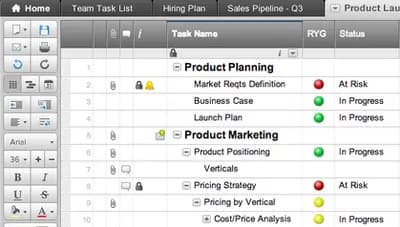
Features include grid, Gantt, and card views, automated workflows, and dashboards. New AI capabilities include automated status updates and resource forecasting. Integrates with Microsoft 365, Google Workspace, and Tableau. Best for teams that need data-driven project tracking and reporting. Weakness: Interface feels less modern than competitors; mobile app is less intuitive. Data point: 70% of users report faster reporting times compared to manual methods.
- –#10
ProofHub
Features include task management, Gantt charts, custom roles, and in-app proofing and approvals. In 2026, it introduced AI task assignment and automated reminders. Integrates with Google Calendar and Dropbox. Best for small to mid-sized teams that want an all-in-one tool without per-user fees. Weakness: Limited third-party integrations and no native time tracking. Data point: Saves teams an average of 20% in software costs compared to per-user pricing models.
Frequently Asked Questions About Project Management Tools
What is the best project management tool in 2026? The best tool depends on your team size and how you work. Monday.com and ClickUp are great all-rounders, Jira Software is the go-to for software teams, and Trello or Basecamp are ideal if you prefer something simple and visual.
Which project management tools are free to use? Trello, Asana (up to 10 users), ClickUp, and Notion all offer free plans in 2026 — a solid starting point for small teams or freelancers before committing to a paid tier.
How do I choose between Monday.com, Asana, and ClickUp? Pick Monday.com for visual dashboards and no-code automations. Choose Asana for clear task dependencies and timeline views. Go with ClickUp if you want the most features per dollar and are comfortable with a learning curve.
Do these tools work for remote and hybrid teams? Yes — every tool on this list supports remote collaboration with cloud access, real-time updates, and integrations with Slack, Microsoft Teams, and Zoom.
Image credits
- Notion: Notion-logo.svg / Wikimedia Commons
- Basecamp: Basecamp logo19.png / Wikimedia Commons
Frequently asked questions
What are the key features to look for in a project management tool in 2026?
Essential features include AI-driven task automation, real-time collaboration, native time tracking, robust reporting dashboards, and seamless integrations with popular tools like Slack, Jira, and Microsoft Teams.
Which project management tool is best for small teams or startups?
Tools like Trello, Asana, and ClickUp are ideal for small teams due to their affordable pricing, intuitive interfaces, flexible workflows, and scalable plans that grow with your business.
How much do top project management tools typically cost per user per month?
Pricing ranges from free basic plans (with limitations) to $10–$30 per user per month for premium features; enterprise plans can exceed $50 per user per month, depending on the tool and required functionality.
Do these tools offer integrations with other software like accounting or HR systems?
Yes, leading PM tools provide extensive integration ecosystems, supporting connections with accounting platforms (e.g., QuickBooks), HR systems (e.g., BambooHR), and development tools (e.g., GitHub) through native connectors or APIs.
Which project management tool is best for agile or scrum teams?
Jira Software, Monday.com, and Asana offer dedicated agile features such as sprint planning, backlog grooming, Scrum boards, and burndown charts, making them top choices for agile teams.
Rank it your way
Remix this list into your own ranking, or head to the play hub for every game mode and community breakdown — blind mode, challenges, tier lists, and more.
You Might Also Like

Top 10 US SaaS Unicorns 2026
Top 10 US SaaS Unicorns 2026

Top 10 Productivity Apps That Actually Changed How People Work
Top 10 Productivity Apps That Actually Changed How People...

Top 10 Free Productivity Apps to Use in 2026
Top 10 Free Productivity Apps to Use in 2026

Top 10 Ars Technica — Latest — April 8, 2026
#1 Iran demands cryptocurrency toll from tankers passing through Strait of Hormuz · #2 Steam client files point to "framerate estimator" feature in the works · #3 For the first time ever, Amazon is cutting old Kindles off from the Kindle Store

Top 10 Ars Technica Stories Today: SpaceX, Apple Local AI & Measles — August 25, 2026
#1 Two unvaccinated people die from measles in Pennsylvania, officials confirm · #2 SpaceX intends to invest up to $100 billion in massive Louisiana spaceport · #3 Lab supply companies have been selling antibodies using manipulated images

Top 10 Tech Stories Today: Artemis II, Leaked CBP Codes, and the AI Boom — April 5, 2026
#1 CBP facility codes sure seem to have leaked via online flashcards · #2 Artemis II is going so well that we're left to talk about frozen urine · #3 Tech companies are trying to neuter Colorado’s landmark right-to-repair law